
You’re trying to figure out Hostinger vs Bluehost for your website.
It’s a common question, and honestly, it can be a bit confusing.
Both are pretty popular, and their prices aren’t wildly different at first glance.
But when you start looking closer at what you actually get, the differences become clearer.
I’ve spent some time with both, setting up test sites and poking around, and I’m here to break down what I found.
We’ll look at how they stack up in terms of cost, speed, features, and how easy they are to deal with. Let’s get this Hostinger vs Bluehost comparison sorted out.
Key Takeaways
- Hostinger generally offers more affordable pricing, especially when you consider renewal rates, making it a better long-term value for many.
- In terms of speed and uptime, Hostinger often has a slight edge in performance tests, with faster loading times reported.
- Bluehost stands out for its customer support, offering phone support, which Hostinger lacks, though Hostinger’s live chat support is generally helpful.
- Hostinger provides more flexibility with sign-up durations and often includes more features like free domain registration and migrations on lower-tier plans.
- Bluehost is a good choice if you prioritize easy WooCommerce integration or prefer direct phone support, while Hostinger is better for budget-conscious users seeking speed and value.
Hostinger vs Bluehost: An Overview

Understanding the Core Offerings
So, you’re looking to get a website up and running, and you’ve stumbled upon Hostinger and Bluehost.
Both are pretty big names in the web hosting world, and honestly, they both do a decent job.
But they aren’t the same, and figuring out which one fits your needs can be a bit of a puzzle.
Think of it like choosing between two similar-looking tools; they might do the same basic job, but one might have a feature that makes your life way easier.
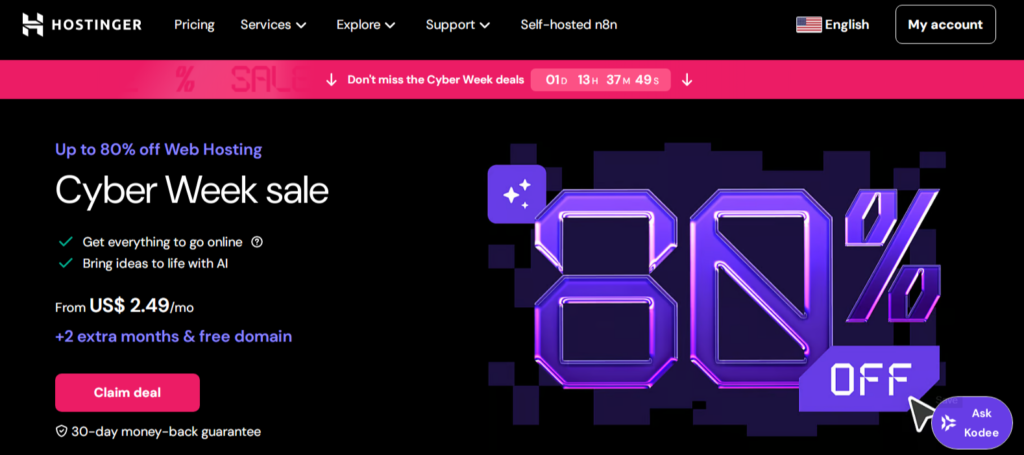
Hostinger often pops up as a budget-friendly option, packing in a lot of features without breaking the bank.
They offer a range of hosting types, from shared plans that are great for starting, to more powerful VPS and cloud options if your site starts getting popular.
They’ve also got this custom control panel that many users find pretty straightforward to use.
Bluehost, on the other hand, is really well-known, especially for its WordPress hosting.
They make it pretty simple to get a WordPress site going, and they’re often recommended for beginners.
They also offer a good range of hosting, including dedicated servers, which are for sites that need a lot of power.
One thing people often mention is their phone support, which can be a big plus if you prefer talking to someone directly.
Key Differentiators at a Glance
When you put them side-by-side, a few things stand out.
Hostinger tends to be more flexible with its sign-up periods, letting you choose shorter terms if you don’t want to commit for years.
They also generally have lower renewal rates, which is something to keep in mind because those initial low prices often jump up when it’s time to renew.
Bluehost, while good, sometimes has limitations on its lower-tier plans.
For example, they don’t offer cloud hosting in the same way Hostinger does, and their renewal prices can be quite a bit higher.
Also, if you’re looking for free website migration, Hostinger usually includes it, while Bluehost might charge extra.
Here’s a quick look at some of the differences:
- Pricing: Hostinger often has lower starting prices and more flexible sign-up terms.
- Renewal Rates: Hostinger generally has more predictable and lower renewal costs.
- Control Panel: Hostinger uses a custom panel, while Bluehost uses a more standard cPanel.
- Migration: Hostinger often includes free website migration.
- Cloud Hosting: Hostinger offers more direct cloud hosting options.
It’s easy to get caught up in the initial price tag,
but looking at the long-term costs, including renewal rates and what’s actually included in the plan, is super important for your budget.
Who is Each Host Best For?
So, who should pick which? If you’re just starting, maybe have a small blog or a personal website, and you’re really watching your budget,
Hostinger is a strong contender.
Their plans are affordable, and their custom control panel is pretty easy to get the hang of.
They’re also a good choice if you want more control over your hosting terms and are looking for lower long-term costs.
Bluehost might be a better fit if you’re specifically setting up a WordPress site and want that streamlined experience.
Their integration with WordPress is a big selling point, and if you really value having 24/7 phone support readily available,
Bluehost has that edge.
It’s also a solid choice if you’re planning on building an online store using WooCommerce, as they make that process quite smooth.
Ultimately, the best choice depends on what you prioritize: cost-effectiveness and flexibility (Hostinger) or a simplified WordPress setup and direct phone support (Bluehost).
Pricing and Value Comparison
When you’re picking a web host, the price tag is usually one of the first things you look at.
It makes sense, right?
You want to get the most bang for your buck.
Both Hostinger and Bluehost have plans that look pretty good at first glance, but there’s more to it than just the initial number.
Let’s break down what you’re actually paying for and what you get in the long run.
Initial Plan Costs
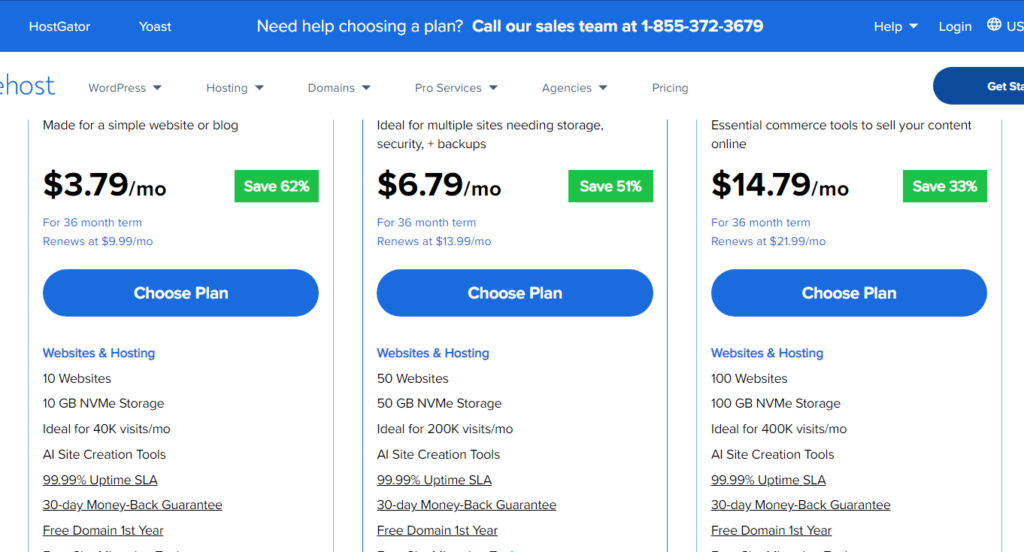
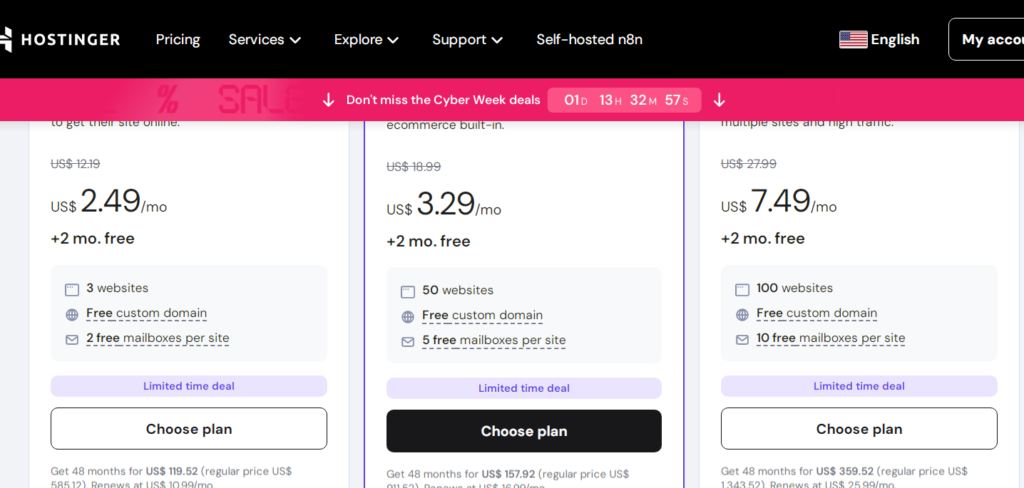
Both companies try to reel you in with low introductory prices.
Hostinger often starts its cheapest plans at around $2.99 per month, which is super affordable.
Bluehost’s entry-level plans used to be even lower, but they’ve bumped them up a bit, often starting around $3.79 per month.
It’s important to remember that these low prices usually require you to sign up for a longer term, like 3 or 4 years.
If you only want to pay month-to-month, the price jumps up significantly for both.
Renewal Rates and Hidden Fees
This is where things can get a little sneaky.
Those super low intro prices?
They don’t last. Once your initial term is up, the renewal rates kick in, and they’re considerably higher.
Bluehost’s renewals can be about 2.5 times the intro price, while Hostinger’s can sometimes be almost 4 times higher.
You’ve got to watch out for that. Also, while both offer freebies like SSL certificates, Hostinger tends to be more upfront about what’s included.
Bluehost sometimes bundles things that might have a limited free period, and you might end up paying more later if you’re not careful.
They also don’t always include free backups on their most basic plans, which is a bit of a bummer.
Long-Term Cost-Effectiveness
So, which one is better for your wallet over time?
Hostinger generally wins here for a few reasons.
Their pricing, even with renewals, often ends up being more predictable and slightly lower overall compared to Bluehost, especially when you look at what you get.
Hostinger also gives you more flexibility with billing cycles, letting you choose shorter terms if you prefer, though longer terms still offer the best rates.
Plus, Hostinger usually throws in more storage and allows for more websites on their lower-tier plans, which adds to the overall value.
If you’re on a tight budget and want to keep costs down without sacrificing too much, Hostinger usually offers a better deal.
When comparing hosting plans, always look beyond the initial advertised price.
Check the renewal rates, the contract length required for the best price, and what features are truly included versus what might cost extra down the line.
This diligence can save you a lot of money and headaches later on.
Here’s a quick look at how their pricing stacks up, keeping in mind these are estimates and can change:
| Feature | Hostinger (Intro Price) | Bluehost (Intro Price) | Hostinger (Renewal Estimate) | Bluehost (Renewal Estimate) |
|---|---|---|---|---|
| Cheapest Plan | ~$2.99/mo | ~$3.79/mo | ~$9.99/mo | ~$7.99/mo |
| Longest Term Req. | 48 months | 36 months | N/A | N/A |
| Free Domain | Yes (with longer terms) | Yes (with longer terms) | N/A | N/A |
| Free Backups | Yes (basic plans) | No (basic plans) | N/A | N/A |
| Storage (Basic) | 25 GB NVMe | 10 GB SSD | N/A | N/A |
| Websites (Basic) | Up to 25 | 1 | N/A | N/A |
Performance Metrics: Speed and Uptime
When you’re picking a web host, how fast your site loads and how often it’s actually online are super important.
Nobody likes waiting for a page to load, and if your site is down, you’re losing visitors and potential customers.
Let’s break down how Hostinger and Bluehost stack up in these key areas.
Website Loading Speeds
Speed is king these days. If your website takes too long to load, people will just click away.
We’ve seen tests that show Hostinger generally loads pages faster than Bluehost.
This often comes down to the technology they use behind the scenes.
Hostinger uses LiteSpeed web server software, which is known for being really efficient.
Bluehost, on the other hand, typically uses Apache servers. While Apache is solid, LiteSpeed often has an edge when it comes to raw speed.
Here’s a general idea of what you might expect:
- Hostinger: Average loading times are often reported around 1.78 seconds.
- Bluehost: Average loading times can be closer to 3 seconds.
That difference might not sound like much, but in the online world, every second counts. It can really affect how visitors experience your site.
Uptime Guarantees and Reliability
Uptime is basically the percentage of time your website is accessible online.
You want this number to be as close to 100% as possible.
Both hosts aim for high uptime, but there can be slight differences in their actual performance.
Some reports suggest that Hostinger has slightly higher uptime, often hovering around 99.99%.
Bluehost’s uptime is also generally good, but might be a touch lower, perhaps around 99.95% in some tests.
It’s worth noting that while guarantees are nice, real-world performance is what truly matters.
Server response time, often called Time to First Byte (TTFB), is another metric to watch. It measures how quickly the server responds to a request from a visitor’s browser.
A faster TTFB means your site starts loading quicker, which is a good sign for both user experience and search engine rankings.
Hostinger usually has a slight edge here too, with quicker response times compared to Bluehost.
Data Center Locations and Reach
Where a host’s servers are located can affect your site’s speed, especially for visitors far from those servers.
Having data centers spread out globally means your website can be served from a location closer to your audience, reducing latency.
Hostinger tends to offer a wider spread of data center locations compared to Bluehost.
This can be a significant advantage if you have an international audience.
Bluehost has fewer locations, which might mean longer travel times for data if your visitors are on the other side of the world from their servers.
- Hostinger: Typically offers more data center locations across different continents.
- Bluehost: Generally has fewer data center locations, often concentrated in specific regions.
Choosing a host with data centers closer to your target audience can make a noticeable difference in how quickly your site feels to them.
Features and Functionality
When you’re picking a web host, it’s not just about the price or how fast your site loads.
You also need to think about what tools and extras you get.
Both Hostinger and Bluehost offer a bunch of features, but they do it a bit differently.
Storage and Bandwidth Inclusions
Both hosts give you a decent amount of storage and bandwidth, especially on their starter plans.
Hostinger tends to offer more NVMe SSD storage, even on their cheaper options.
This is great if you plan on uploading a lot of images or videos to your site.
Bluehost’s lower-tier plans can feel a little cramped storage-wise if you’re not careful.
| Feature | Hostinger (Starting) | Bluehost (Starting) |
|---|---|---|
| Storage | 50 GB NVMe SSD | 10 GB NVMe SSD |
| Bandwidth | Unmetered | Unmetered |
| Websites Allowed | Up to 100 | Up to 10 |
Website and Domain Allowances
This is where things can get a bit more varied.
Hostinger often lets you host multiple websites on a single plan, even their basic ones, which is a nice perk.
Bluehost usually limits the number of websites you can host on their entry-level plans.
For domains, both usually include a free one for the first year with certain plans, but always check the fine print.
Specialized Tools and Integrations
This is a big area where the two hosts really show their differences.
Hostinger has its own custom control panel called hPanel.
It’s pretty straightforward and makes managing things like email accounts, DNS, and even PHP versions easy.
They also include things like free SSL certificates and, on higher plans, a staging tool, which is super handy for testing changes before they go live.
Bluehost uses the more traditional cPanel, which many people are familiar with, and also offers a staging environment, though it might cost extra on lower plans.
- Hostinger’s hPanel: Known for its clean design and ease of use.
- Bluehost’s cPanel: A long-standing industry standard, with lots of tutorials available.
- Staging Environment: Useful for testing website updates.
Hostinger also has some unique tools like an AI website builder and an email marketing tool called Hostinger Reach.
Bluehost focuses more on integrating with popular platforms like WordPress and WooCommerce, which is great if that’s your main focus.
When it comes to email accounts,
Hostinger is generally more generous, offering more free accounts on most plans compared to Bluehost, which might limit you or require payment after a trial period.
Security and Backup Solutions
When you’re running a website, keeping it safe and having a way to recover it if something goes wrong is super important.
Both Hostinger and Bluehost have features to help with this, but they do things a bit differently.
Included Security Features
Both companies offer basic security measures to protect your site.
Find free SSL certificates with both, which is great for encrypting data between your site and visitors.
Hostinger also throws in DDoS protection and a web application firewall on all its WordPress plans.
Bluehost includes SiteLock Free for malware scanning with all plans, which is a nice addition.
Automated Backup Options
Losing your website data is a real headache, so backups are a big deal.
Hostinger provides free weekly backups for all WordPress plans, and if you step up to their Business WordPress plan, you get free daily automated backups.
This means your site is regularly saved without you having to lift a finger.
Bluehost’s backup situation is a bit more spread out.
Their Choice Plus and Pro plans come with free automated backups powered by CodeGuard.
However, if you’re on the Basic or Plus plans, you’ll need to buy backups as an extra.
This difference in how backups are included can really affect the long-term cost and convenience.
SSL Certificates and Domain Privacy
SSL certificates are pretty standard now, and thankfully, both Hostinger and Bluehost include them for free.
This helps secure your website and shows visitors that your site is trustworthy.
Domain privacy is another feature that keeps your personal information hidden from public view in domain registration records.
Bluehost includes free domain privacy with all its plans,
while Hostinger doesn’t explicitly mention it as a standard free inclusion across all tiers, though it might be available as an add-on or included in specific higher-tier packages.
Keeping your website secure and backed up doesn’t have to be complicated. Look at what’s included by default with the plan you’re considering.
Sometimes, what seems like a cheaper plan upfront can end up costing more if you have to pay extra for essential features like regular backups.
Customer Support and User Experience
When your website throws a tantrum, who’s there to help?
That’s where customer support and the overall user experience come into play.
It’s not just about getting things fixed; it’s about how easy and pleasant the whole process is.
Support Channels Available
Both Hostinger and Bluehost offer 24/7 live chat, which is pretty standard these days.
But Bluehost goes a step further by including phone support, which can be a lifesaver if you prefer talking things through.
Hostinger, on the other hand, sticks to live chat and a pretty extensive knowledge base. If you’re in a region where English isn’t the primary language,
Hostinger has an edge, offering support in multiple languages like Spanish, Portuguese, and Chinese, whereas Bluehost primarily sticks to English.
Response Times and Helpfulness
This is where things get interesting.
In our tests, Bluehost’s live chat was lightning fast, with support staff jumping in within a minute.
Hostinger’s chat, while helpful and detailed in its explanations, sometimes required a bit more patience, with wait times stretching to a few minutes or even longer.
So, if speed is your absolute top priority,
Bluehost might feel a bit quicker off the mark.
However, if you value thorough, detailed answers, even if it means a short wait, Hostinger delivers.
Ease of Use and Control Panel
When you first log in, you’ll be greeted by either Hostinger’s custom hPanel or Bluehost’s cPanel.
Hostinger’s hPanel is often praised for its clean, modern design and straightforward layout, making it feel really user-friendly, especially for beginners.
Finding things like domains, emails, and backups is usually a breeze.
Bluehost uses cPanel, which is a long-standing industry standard.
While it might not look as flashy, its familiarity means there are tons of tutorials out there if you get stuck.
For most users, the difference isn’t huge, as both are quite similar in functionality, but Hostinger’s hPanel often gets the nod for its intuitive feel.
The control panel is your command center for your website. A good one makes managing your hosting feel less like a chore and more like a simple task.
It should be easy to find what you need without digging through endless menus.
Here’s a quick look at how they stack up:
| Feature | Hostinger (hPanel) | Bluehost (cPanel) | Winner |
|---|---|---|---|
| Initial Feel | Modern, Clean | Familiar, Standard | Hostinger |
| Navigation | Very Intuitive | Standard | Hostinger |
| Beginner Friendliness | High | Moderate | Hostinger |
| Resource Availability | Good Knowledge Base | Extensive Tutorials | Bluehost |
So, Which One Should You Pick?
Alright, so we’ve looked at both Hostinger and Bluehost, and it’s pretty clear they both have their good points.
If you’re just starting, maybe building a personal blog or a small business site, and you’re watching your wallet,
Hostinger seems like the way to go.
It’s generally cheaper, and our tests showed it was a bit faster.
But, if you’re really into the idea of talking to someone on the phone when things go wrong, or if you’re setting up a big online store with WooCommerce,
Bluehost might feel more comfortable.
Honestly, for most people just trying to get a website up and running without breaking the bank, Hostinger wins out.
But hey, if those specific Bluehost features are what you need, it’s still a solid choice.
Frequently Asked Questions
Which hosting service is cheaper, Hostinger or Bluehost?
Hostinger usually offers the cheapest plans, often starting at a lower monthly price than Bluehost. This makes Hostinger a great choice if you’re really watching your budget.
Which host is better for beginners?
Both are good for beginners, but Hostinger might have a slight edge because its control panel is often considered more modern and easier to navigate.
However, Bluehost is also very user-friendly and recommended by WordPress.
Do Hostinger and Bluehost offer free domain names?
Yes, both Hostinger and Bluehost typically include a free domain name with their longer-term plans. It’s a nice perk that saves you a bit of money when you first set up your website.
How do their prices change after the first term?
This is important! The low prices you see are usually for the initial signup period.
After that, the renewal rates for both can go up. It’s wise to check the renewal costs to understand the long-term price.
Which host has better customer support?
Bluehost offers phone support in addition to live chat, which many people prefer. Hostinger primarily offers live chat and a knowledge base.
While both have helpful support, Bluehost’s phone option can be a big plus for some.
Is Hostinger faster than Bluehost?
In many tests, Hostinger tends to load websites a bit faster than Bluehost. This can be important for keeping visitors on your site and for search engine rankings.